

4 Months of Service
Hi everybody,
Please read this before you create your resource or upload your WordPress items.
The first and most important thing to do: if you upload resources from codecanyon or themeforest please make sure that you remove from your archive name the unique identifier number found right after codecanyon word
Example: themeforest-SBMJuqoG-coowhm-multipurpose-whmcs-template.zip
remove SBMJuqoG code so the archive name will be:
themeforest-coowhm-multipurpose-whmcs-template.zip
- Search before if want to create new resource and if you want to update a resource, please tell me to move resource to your account.
- You may create a new resource if you possess the purchased items or clean, untouched files (without tags), provided the resource does not already exist.
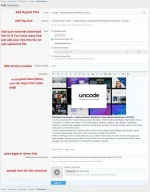
-How To Create New Resource (After you Create a New Resource, Automatically Discussion Page Created On First Page )

How To Update Your Resource:
For Updating Just go to your resource page you want to be updated and click on "POST AN UPDATE"

Also, Your Resource Need to Be Approved before it is published so be patient
Thanks,
Giant Gamers
Please read this before you create your resource or upload your WordPress items.
The first and most important thing to do: if you upload resources from codecanyon or themeforest please make sure that you remove from your archive name the unique identifier number found right after codecanyon word
Example: themeforest-SBMJuqoG-coowhm-multipurpose-whmcs-template.zip
remove SBMJuqoG code so the archive name will be:
themeforest-coowhm-multipurpose-whmcs-template.zip
- Search before if want to create new resource and if you want to update a resource, please tell me to move resource to your account.
- You may create a new resource if you possess the purchased items or clean, untouched files (without tags), provided the resource does not already exist.
-How To Create New Resource (After you Create a New Resource, Automatically Discussion Page Created On First Page )
How To Update Your Resource:
For Updating Just go to your resource page you want to be updated and click on "POST AN UPDATE"
Also, Your Resource Need to Be Approved before it is published so be patient
Thanks,
Giant Gamers